Summary:
HCM software is an integrated system that manages the full employee lifecycle — recruiting, payroll, benefits administration, performance management, and development — in one place, from the day a person applies to the day they leave. It keeps employee data connected across every function, so HR, payroll, and managers all work from the same information.
If that sounds abstract, consider the alternative. Payroll runs in one tool. Time tracking lives in another. Performance reviews sit in a spreadsheet someone rebuilds every quarter. Compensation and benefits are handled through a portal only two people know how to log into. Every handoff between them is a chance to introduce an error, and by the time you catch one, it’s already in someone’s paycheck.
HCM software exists to close those gaps. The term itself carries two meanings — a management philosophy that treats your workforce as an asset worth investing in, and the category of software built to support it. This guide covers both, and shows what the approach looks like in practice on a human capital management platform like Paylocity.
What Is Human Capital Management (HCM)?
Human capital management is the set of practices you use to recruit, pay, develop, and retain your people. It treats employees and employee engagement as a source of long-term value and ties everyday HR work to broader business goals such as growth, retention, and productivity.
From “Personnel” to “Human Capital”: A Strategic Shift
For most of the twentieth century, the function we now call HR was known as “personnel.” Its job was largely administrative: keeping records, processing pay, handling paperwork. The work mattered, but it sat at the edge of business strategy rather than the center of it.
That changed as companies came to see skilled employees as a competitive advantage. The phrase “human capital” reframed the workforce as something you build and invest in, much like equipment or HR technology. Hiring, training, and retention stopped being back-office chores and became levers for performance.
The shift wasn’t only conceptual — it renamed the profession. The field’s largest association was founded in 1948 as the American Society for Personnel Administration and didn’t become the Society for Human Resource Management until 1998, by which point “personnel” no longer described what the job had become. HCM is the management approach that grew out of that shift.
HCM as a Philosophy vs. HCM as Software
It helps to keep the two senses of the term separate. As a philosophy, HCM is about how you treat and develop people: setting clear goals, supporting growth, and measuring whether your workforce strategy is working. As software, it’s the HR technology that makes the philosophy practical at scale. You can hold the philosophy without an HCM system. But past a certain size, the software is what lets you act on it consistently.
What Is HCM Software?
HCM software brings the major functions of people management — hiring, payroll, benefits, time tracking, performance, and reporting — into a single connected system. Because the modules share one set of employee records, information you enter once is available everywhere it’s needed. A new hire’s details flow from recruiting into onboarding, payroll, and benefits without anyone re-keying them.
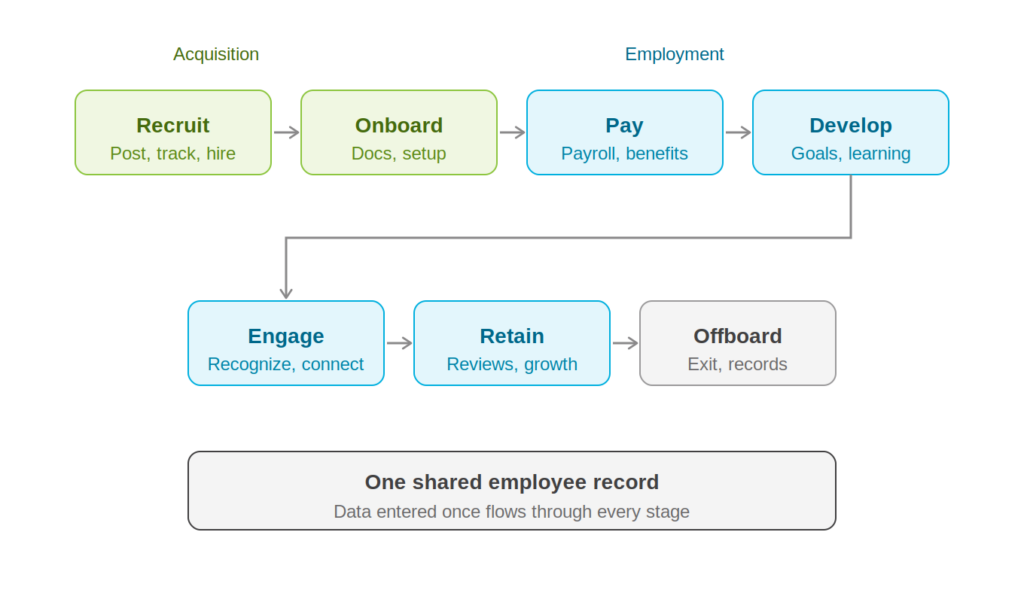
The Digital Backbone of People Operations
Without a unified system, employee data scatters. Each handoff between tools is a chance for an error or a delay, and the errors surface late — in a paycheck, in a compliance filing, in a report your leadership team is about to act on. HCM software is the backbone that connects those pieces. One accurate record for everything related to your people means fewer surprises and faster answers when someone asks a hard question.
HCM vs. HRIS vs. HRMS: Clearing Up the Confusion
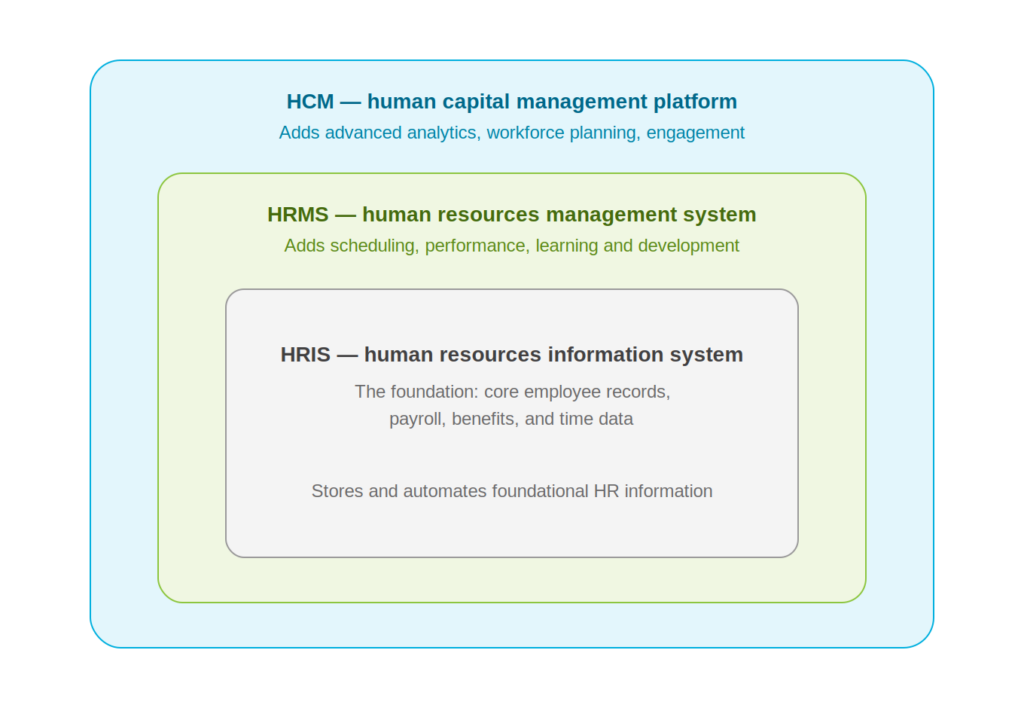
Three acronyms often get used interchangeably, but they describe different scopes.
An HRIS (human resources information system) is the foundation. It stores and manages core employee data — records, payroll, benefits, and time — and automates the basic processes around them.
An HRMS (human resources management system) includes everything an HRIS does and adds management-oriented features such as scheduling, performance management, and learning and development.
An HCM (human capital management) platform is the broadest of the three. It covers the full employee lifecycle and layers on more strategic capabilities, including advanced analytics and workforce planning. In practice, vendors use these labels loosely, so compare the actual features rather than the name.
| System | Core focus | Typical scope | Best for |
|---|---|---|---|
| HRIS | Employee data and records | Core HR data, payroll, benefits, time | Storing and automating foundational HR information |
| HRMS | HRIS plus workforce and talent management | Everything in an HRIS, plus scheduling, performance, and learning | Teams adding management and talent processes |
| HCM | The full, strategic employee lifecycle | Everything in an HRMS, plus advanced analytics, planning, and engagement | Organizations treating their people as a strategic asset |
The Core Capabilities of a Modern HCM Platform
A full HCM platform is made up of several modules that work together. The most common ones are below.
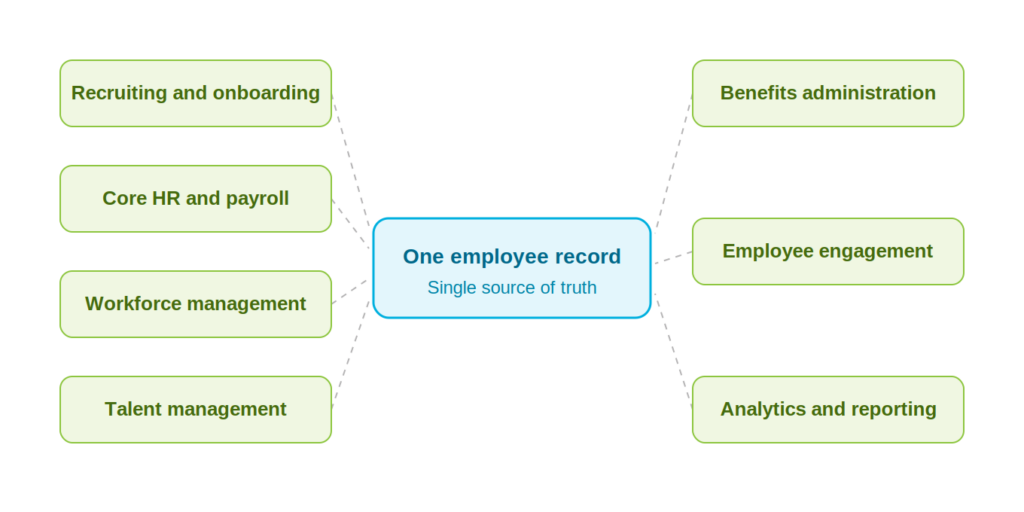
Talent Acquisition and Onboarding
The employee experience starts here. Applicant tracking tools let you post jobs, manage candidates, and move people through hiring without losing anyone in an inbox. Once someone accepts, onboarding handles the paperwork, collects documents, and gets them set up before day one. Look for a system where the offer flows straight into onboarding — if your new hire’s details get typed twice, you’ve bought a filing cabinet, not a platform.
Core HR and Payroll
Payroll is the function you use most, and the one where accuracy isn’t negotiable. The system calculates wages, taxes, and deductions, handles direct deposit, and manages filings and year-end reporting. Because payroll reads from the same records as everything else, a change to someone’s hours or status carries through on its own. Core HR fills in the rest: employee profiles, and self-service so people can pull their own pay stubs.
Workforce Management
Your employees clock in from the web, a phone, or a time clock on the wall, and those hours land in payroll without anyone retyping them. You build schedules, approve time off, and watch labor costs accrue as they happen rather than at month-end. If you run hourly staff or shift work, this is usually the module that pays for the platform on its own.
Talent Management
Hiring someone is the start of the work, not the end of it. Talent management covers performance reviews, goal setting, compensation planning, and a learning and development system for training and certifications. Used together, they let your managers give continuous feedback on a schedule instead of once a year, pay people consistently, and show employees a path forward. Each of those boosts employee engagement, and retention is cheaper than recruiting.
Benefits Administration
Benefits are hard to administer and easy to get wrong. This module runs open enrollment, lets your employees compare plans and choose for themselves, and tracks eligibility and deductions without a spreadsheet in the middle. It keeps you on the right side of regulations like the ACA, and it connects to your carriers so records update on their own. Fewer manual touches, fewer places for a costly mistake to hide.
Employee Experience and Engagement
This is the newest part of the category, and it’s about connection rather than administration. Recognition tools, internal communication, shared spaces where coworkers actually talk to each other. As hybrid and remote work have become normal, these have stopped being nice-to-haves when analyzing the employee experience. When your people are spread across time zones, the need for strong employee engagement increases. The platform is often the only place the company exists in one piece — and disengaged employees leave.
Workforce Analytics and Reporting
Because the platform holds data from the entire lifecycle, it can show you things you’d otherwise miss. Turnover concentrated in one department. Overtime climbing in a single location. What an open role is actually costing you while it sits unfilled. Good reporting moves you from arguing about what you think is happening to agreeing on what is. That’s the difference between a hunch and a decision.
The Business Value of HCM Software
The case for HCM software comes down to four outcomes.
Administrative Efficiency Through Automation
Manual HR work — re-entering data, chasing approvals, reconciling spreadsheets — consumes hours that add little value. Automated workflows gives that time back to your HR team for work that does add value. You also remove the mistakes that come with manual entry.
A Better Experience for Employees and Managers
Self-service is a quiet but meaningful benefit. When your employees can check a pay stub, request time off, or update their information without filing a request, they get answers sooner and HR fields fewer routine questions. Your managers get the same convenience for approvals and team information. Everyone spends less time waiting on someone else.
Data-Driven Decision-Making
With accurate data in one place, you can answer real questions. Which departments are losing people? Where are labor costs climbing? Is the new program working? Decisions that once relied on instinct start resting on evidence — and evidence is easier to defend in a budget meeting.
Compliance and Data Security
Employment law changes often and varies by location. An HCM platform tracks tax rules, wage requirements, and reporting obligations, and it stores sensitive employee data under stronger protection than scattered spreadsheets or filing cabinets can offer. That lowers your compliance risk and your exposure to a breach at the same time.
Signs Your Business Needs an HCM Solution
Not every company needs a full HCM platform on day one. These are the signals that it’s time to consider one.
You’ve Outgrown Spreadsheets and Disconnected Systems
A process that worked at ten employees often breaks at fifty. Payroll takes longer. Data lives in too many places. Reports stop being reliable because the underlying numbers no longer agree. When keeping your systems in sync becomes a job of its own, a unified platform usually pays for itself.
You’re Managing a Hybrid or Multi-State Workforce
Remote and multi-location teams add complexity: different tax jurisdictions, varying labor laws, and employees who rarely set foot in an office. An HCM platform handles multi-state payroll and compliance, and it gives a dispersed workforce a consistent way to reach HR from anywhere.
You Can’t Spot Talent Gaps Until They Become Crises
Without good data, problems like high turnover on a key team or a coming wave of retirements surface only after they’ve done damage. HCM analytics make those patterns visible while you still have time to act.
How to Choose the Right HCM Software
Once you’ve decided to evaluate platforms, a few criteria separate a good fit from a poor one.
Usability and Mobile Access
A system only returns value if people actually use it. Look for a clean interface your employees and managers can navigate without extensive training, and a mobile app that does more than mirror the website. Everyday tasks — clocking in, checking a stub, approving time off — should be easy from a phone. Adoption is the whole game.
Scalability and Integrations
Choose for where you’re headed, not only where you are. The platform should support more employees, new locations, and added complexity without forcing a switch later. Just as important is how well it connects to the tools you already run, like accounting or general ledger software, so data moves between systems instead of being entered twice.
Implementation, Support, and Training
A platform is only as good as the rollout behind it. Setup, data migration, and training take real effort, and the support you get during that stretch shapes how quickly your team sees value. Ask vendors what implementation looks like, who you’ll work with, and what ongoing support is included. A capable, responsive partner is often the difference between software that’s adopted and software that’s set aside.
The Future of HCM: AI, Automation, and Predictive Insights
The category is moving from recording what happened toward helping you anticipate what’s next.
AI Assistants for Routine Questions
A growing share of routine employee questions — PTO balances, policy details, how to update a form — can now be handled by AI assistants built into the platform. Your employees get instant answers, and your HR team keeps its time for work that needs human judgment.
Predictive Analytics and Workforce Planning
Rather than only reporting on the past, newer tools help you forecast: flagging likely turnover, modeling staffing needs, planning headcount before gaps appear. The value shifts from looking back to looking ahead.
These same analytics are starting to connect HR data with financial planning, giving you a clearer view of how workforce decisions affect cost. It’s an early trend, but a useful signal of where the category is heading.
HCM Software in Action: How Paylocity Brings It Together
Everything above — hiring, payroll, time, talent, benefits, engagement, and analytics — is what Paylocity provides in a single platform. Rather than stitching together separate tools, you run these functions from one system with shared data, which is what makes the broader HCM approach workable in practice.
For a closer look at how the full platform fits together, see our overview of what Paylocity is and what it does. To see it firsthand, you can book a consultation.
Frequently Asked Questions
Is HCM the same as HR?
Not exactly. HR is the function; HCM is a broader, more strategic approach to it, along with the software that supports it. HCM includes traditional HR work but adds development, planning, and analytics on top.
Does HCM software include payroll?
Yes. Payroll is a core part of most full HCM platforms, including tax filing and year-end reporting. Because payroll shares data with the rest of the system, it stays in sync with changes to hours, pay, and employee status.
What’s the difference between HCM and an applicant tracking system?
An applicant tracking system (ATS) handles recruiting and hiring only. It’s one feature within a full HCM platform, which also covers payroll, benefits, performance management, and the rest of the employee lifecycle.
Is HCM software only for large companies?
No. Large organizations were early adopters, but HCM platforms now serve businesses of many sizes, including growing small and mid-sized companies that want to avoid the cost and disruption of switching systems later.